
How To Restart An Event In Burnout Paradise

Feb 8th, 2009 | By TheFluffyFist | Category: News

BurnoutParadise-LogoWhiteOk, so Criterion have added the restart feature to Burnout Paradise with the free 6th Feb 09 update. But where the heck is it?

You’d think that after failing an event you’d see an option to restart it? Err, no. Its been added to the options menu opened by pressing the right d-pad button:
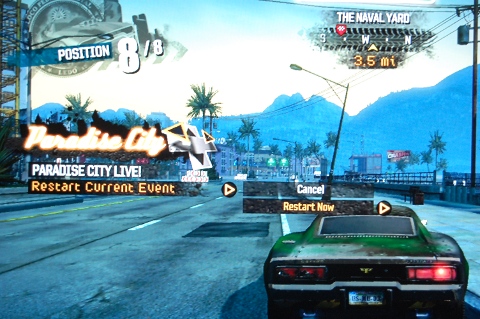
BurnoutParadiseRestart

Also the restart option is only available during an event! When you fail an event the option disappears and pressing right on the d-pad opens up your freeburn online menu as it always has. If you want to restart the last event you can do this as well now. As before press right on the d-pad to open up the Paradise City Live! menu. You should now see the option “restart previous event.”

Tags: , ,

Want to read our posts without the ads? Subscribe or catch us on Facebook

8 Comments to “How To Restart An Event In Burnout Paradise”

  1. Eric says:

    Thanks for this, I couldn't figure it out for the life of me. This is the only site I've seen to actually tell you how it's done!

    • Berke says:

      Yeah! I was wondering where it was too, and it's hard to find it on the web as well…
      The official statement is kind of misleading…

      "You ask – we deliver. Restart is in! You can now quit or fail an event and choose to restart it."

      Fail an event AND choose to restart? I don't think so. You need to restart Before failing!

  2. @Berke Thanks, I'd missed the restart previous event option. I've updated the post accordingly :-)

  3. Anna says:

    Hehe thx for this man.

  4. sychnant says:

    I have Burnout Ultimate box on my PC and have it configured for my Logitech G27 steering wheel but now i cant find the button too open up Paradise City Live so as to use the restart function.I cant find any mention of it in the controls..Grrrr I used to have it working ok.. any help please…

  5. Weefz says:

    Sorry sychnant, don’t have the PC version so wouldn’t have a clue. I’ve asked on twitter – will let you know if any of my friends can help.

  6. sychnant says:

    Thanks Weefz, the more help the better.. Take Care :-)

Leave a Comment