The Average Gamer

Windows Vista – Xbox Live Friend Watch Sidebar Gadget

Windows Vista LogoAdam Kinney (a Microsoft developer) has developed a Vista sidebar gadget that can show you up to 5 Xbox Live friends. This is what the gadget looks like on my system:
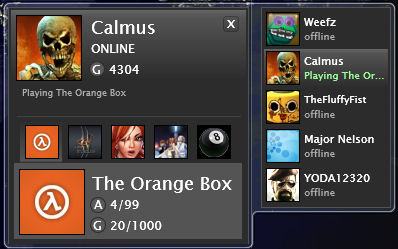

Vista Xbox Friends Gadget

To run this gadget you’ll need:

The only problem I had getting this gadget working was related to my 64bit version of Vista. Since this gadget currently doesn’t support a 64bit operating systems (as it turned out) I had to set Vista’s sidebar application in 32bit mode. It’s easy to do though:

  • In the System Tray right-click on the Sidebar icon and select Properties
  • Uncheck the “Start Sidebar when Windows starts” option
  • Go to C:\Program Files (x86)\Windows Sidebar
  • Drag and hold Sidebar.exe over the start orb
  • Then drag and hold it over All Programs
  • And again (drag and hold) over startup
  • Now drop it into startup

That’s it. Now I can keep an eye on Weefz’s gaming activities since she’s just bought a 360 Elite!

16 Comments

  1. Weefz

    29th Oct, 2007 at 11:59 pm

    OMG, stalker! eek!

  2. JoRo79

    22nd Feb, 2008 at 3:49 pm

    Works Great!

  3. Adamski

    8th Mar, 2008 at 1:22 pm

    At last an xbox friends gadget that works!! Superb

  4. tv bracket

    12th Apr, 2008 at 3:54 am

    What is the fun with only watching and not involving in the game?

  5. TheFluffyFist

    12th Apr, 2008 at 2:06 pm

    It’s handy for me as my PC isn’t in the same room as the 360, so when I see people online I go join (in theory anyway!)

  6. KEVIN

    4th Jul, 2008 at 11:10 pm

    great gadget,only i have a few questions.

    1. can you add this gadget to the side bar more than once allowing more
    than 5 friends in theory to be shown

    2. can/are the gamer tag details retained after a reboot.

    3. is there anything specific needed to achieve the above

  7. TheFluffyFist

    5th Jul, 2008 at 9:35 am

    Hi Kevin,

    1. Yes
    2. Yes
    3. No

    Easy :-)

  8. xTNPx Wo

    2nd Dec, 2008 at 2:47 am

    i only have one problem with this gadget and that is there is no refresh on it at all i added my self and the signed on to my xbox and nothing changed it still said i was offline?!? whats up with that?

  9. Patrick Liu

    4th May, 2009 at 7:13 am

    Same problem here as xTNPx Wo encountered.

  10. Nick

    27th Oct, 2009 at 6:34 am

    i have windows vista, installed silverlight, and downloaded the gadget, i even followed the steps on switching it to "32 bit mode" but it will not show the friends i enter into the list… is there anything else i need to do or i am doing wrong? please reply to DU3LMAUL3RS@yahoo.com

  11. Pingback: Xbox 360 Links | E74 Error

  12. mike

    6th Apr, 2010 at 12:32 pm

    to nick, i had the same problem, and after doing some research, it seems that it is not yet compatible with silverlight 3.0, so your poocked if you have a new version of silverlight

  13. Petrus

    8th Jun, 2010 at 4:00 pm

    It’s good. I can watch my friends if they are online. I can message them to play a game. Hope it will get more improvements.

    Game

  14. india loka

    4th Jul, 2010 at 7:37 am

    dang! Need to change from xp to vista now :D

  15. charles

    20th Jul, 2010 at 1:08 am

    I hope it works, the one I have now is rarely ever accurate.

  16. huck75

    10th Nov, 2011 at 9:35 pm

    I installed silverlight, then tried to add this to my sidebar. I keep getting a lil bubble that says to get silverlight. I also tried the remedy for 64bit vista & still get the same bubble! What’s up?