
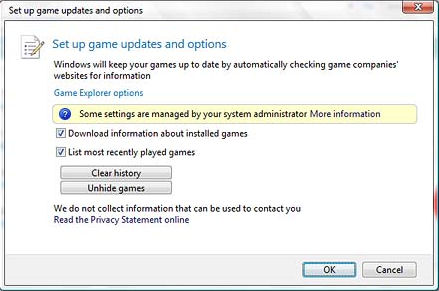
Microsoft is due to release the latest version of the Windows OS (Windows Vista) towards the end of this year. One of the more interesting features that Microsoft has added, and kept pretty quiet, is Vista’s ability to keep your games up to date by checking game companies’ websites for updates.
You can get hold of programs that will do this very thing already, i.e. save you the time and hassle of looking for patches/updates to your favourite games. A very good example of this is GameShadow.
Valve Software have gone down a different route and use their own software distribution system (Steam) to not only provide you with the game(s) in the first place but also to ensure that they are always up to date. However, the only drawback to both these solutions is that they require you to install additional software.
Now Microsoft is saying that Windows Vista can look after all your games for you, free of charge, no problem matey, ta very much.
Quite how effective this will be and how much support the games companies will give Microsoft remains to be seen, but theaveragegamer.com will keep you informed of any developments prior to Vista’s release later this year.


I can’t find the “game manager” in my Windows Vista – how do I locate it ???? I’m trying to download a game from Bigfishgames and nothing happens.
Hi Leeta,
If you go to start>games you will see icons for all the games that you’ve installed on your PC.
At the top of this games window there will be a number of menu items. Click on the one that says options and you should see the game updates and options window (as shown in this post).
thefuffyfist
I found all that you mentioned, but that doesn’t help me in finding out why I can’t download a Big Fish game. I’ve bought and downloaded quite a few of the Big Fish games from AOL, but nothing I do lets me download the game from either the AOL or Big Fish Games sites. It’s on AOL Games and Bigfishgames.com
I read the comments on the AOL site and it seems quite a few people are having the same problem. There were a couple of the people that did manage to download it. I followed all BigFish directions in their help section which took hours and still nothing. It says 99% downloaded with 3 seconds to go and it just sits there. If you touch the download screen it disappears. I’ve tried “run” and “save”.
I finally got a letter from BigFish – saying to download “Mozilla Fox” to change from my Internet Explorer – I really don’t want to do that.
Any other ideas ? Thanks for the quick reply, Leetta
Sorry to hear that you’re still having problems.
Personally, I use Firefox as my main browser, so maybe try that as Big Fish have mentioned. Or you could try using Google’s Chrome browser which is also good (yeah, I use this too).
Otherwise, I can only suggest contacting Big Fish again.
thefluffyfist