
Windows Vista – Xbox Live Friend Watch Sidebar Gadget
- Updated: 29th Oct, 2007
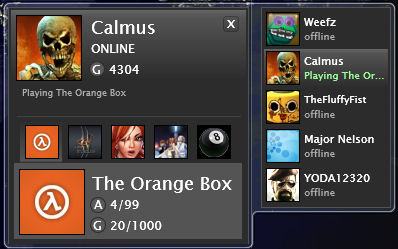
 Adam Kinney (a Microsoft developer) has developed a Vista sidebar gadget that can show you up to 5 Xbox Live friends. This is what the gadget looks like on my system:
To run this gadget you’ll need:
- Windows Vista
- Silverlight v1.0 installed
- The Xbox Live friend watch gadget itself (note: install Silverlight first)
- Xbox Live friends (although you can just add anyone)
The only problem I had getting this gadget working was related to my 64bit version of Vista. Since this gadget currently doesn’t support a 64bit operating systems (as it turned out) I had to set Vista’s sidebar application in 32bit mode. It’s easy to do though:
- In the System Tray right-click on the Sidebar icon and select Properties
- Uncheck the “Start Sidebar when Windows starts” option
- Go to C:\Program Files (x86)\Windows Sidebar
- Drag and hold Sidebar.exe over the start orb
- Then drag and hold it over All Programs
- And again (drag and hold) over startup
- Now drop it into startup
That’s it. Now I can keep an eye on Weefz’s gaming activities since she’s just bought a 360 Elite!
16 Comments
About Nick Silversides (CaptSkyRocket)

Follow Us!


Pingback: Xbox 360 Links | E74 Error